
What a website begins with?
- For a browser a website begins with a page GET-request.
- Server responds with page’s HTML-code.
- The browser parses the code and starts loading all the external files (JS, CSS, Flash, etc.) in the order they appear in the code.
- Normally the browser uses no more than 2 streams for loading external files, and CSS, and JS load in a single thread.
- The time of each request depends on the size of the returned response, server load and activity on each computer all the way between the browser and the server.
- The larger the file size , the longer it takes to deliver it to the browser.
- The larger the number of files , the longer it will take to load the entire page.
How does the browser render the page?
Until all JS from HEAD is fully loaded the user sees a "white page". When all the external scripts are loaded the user sees the content of the page and the execution of JS starts in the order of elements on the page (top to bottom).
Thus, to increase the speed of page load it’s necessary to:
- reduce the HEAD scripts size and count
- reduce the number of files (images are combined into sprites, JS and CSS are aggregated)
- use HTTP-compression
- increase the number of hosts, from which the static elements are loaded, so that the browser could increase the limit concurrent connections
- Move JavaScript to the page footer, so that it loaded last, and the user could already use the page.
Optimizing graphics and creating sprites are the responsibilities of a graphic designer or a markup coder, we'll get down to optimizing JavaScript and CSS-files in Drupal.
Let's see how things are going with these files in Drupal.
Situation analysis
JavaScript
You can check the size of your JS-files yourself by running:
find . -name '*.js' -exec ls -l {} \; | awk '{s+=$5} END {print s}'
In our project , except for core files, there are also over 1300 (!) JS-files, which are contained in additional modules and themes.
Total size of all JS-files - 14,746,899 bytes.
In the Drupal 6 core I found the following Javascript-files:
- modules/comment/comment.js
- modules/profile/profile.js
- modules/openid/openid.js
- modules/taxonomy/taxonomy.js
- modules/system/system.js
- modules/block/block.js
- modules/color/color.js
- modules/user/user.js
- misc/autocomplete.js
- misc/drupal.js
- misc/collapse.js
- misc/batch.js
- misc/farbtastic/farbtastic.js
- misc/form.js
- misc/tableselect.js
- misc/ahah.js
- misc/tabledrag.js
- misc/textarea.js
- misc/progress.js
- misc/tableheader.js
- misc/teaser.js
- misc/jquery.form.js
- misc/jquery.js
Fortunately, they don’t load on one page all at once, some are not even used. The module developer is responsible for configuring the conditions of JS and CSS-file connection on this page so that useless code wouldn’t reduce the page loading speed.
CSS-files
You can check the size of your CSS files yourself by running:
find . -name '*.css' -exec ls -l {} \; | awk '{s+=$5} END {print s}'
In our project, except for core files, there are also about 450 files contained in additional modules and themes.
Total size of all CSS files - 1,674,793 bytes.
With regard to CSS-files in the Drupal 6 core, here they are:
- modules/locale/locale.css
- modules/aggregator/aggregator-rtl.css
- modules/aggregator/aggregator.css
- modules/update/update.css
- modules/update/update-rtl.css
- modules/poll/poll.css
- modules/poll/poll-rtl.css
- modules/comment/comment-rtl.css
- modules/comment/comment.css
- modules/tracker/tracker.css
- modules/forum/forum-rtl.css
- modules/forum/forum.css
- modules/book/book.css
- modules/book/book-rtl.css
- modules/profile/profile.css
- modules/search/search-rtl.css
- modules/search/search.css
- modules/openid/openid.css
- modules/node/node-rtl.css
- modules/node/node.css
- modules/taxonomy/taxonomy.css
- modules/system/system-menus-rtl.css
- modules/system/admin-rtl.css
- modules/system/admin.css
- modules/system/maintenance.css
- modules/system/defaults-rtl.css
- modules/system/defaults.css
- modules/system/system-rtl.css
- modules/system/system-menus.css
- modules/system/system.css
- modules/block/block.css
- modules/color/color.css
- modules/color/color-rtl.css
- modules/help/help.css
- modules/help/help-rtl.css
- modules/dblog/dblog.css
- modules/dblog/dblog-rtl.css
- modules/user/user.css
- modules/user/user-rtl.css
- misc/print-rtl.css
- misc/farbtastic/farbtastic.css
- misc/print.css
- themes/bluemarine/style.css
- themes/bluemarine/style-rtl.css
- themes/garland/print.css
- themes/garland/style.css
- themes/garland/minnelli/minnelli.css
- themes/garland/color/preview.css
- themes/garland/style-rtl.css
- themes/garland/fix-ie.css
- themes/garland/fix-ie-rtl.css
- themes/pushbutton/style.css
- themes/pushbutton/style-rtl.css
- themes/chameleon/common-rtl.css
- themes/chameleon/style.css
- themes/chameleon/marvin/style.css
- themes/chameleon/marvin/style-rtl.css
- themes/chameleon/common.css
- themes/chameleon/style-rtl.css
The total size of CSS files is a lot smaller than the size of JS files, but we have to keep in mind the fact that there are a lot more CSS files on the page than JS files (about 2 times more). In addition, the styles tend to load for all pages (these are theme styles), and only the module styles can load for certain pages. Therefore both the style files and the scripts require our equal attention.
Limitations of Internet Explorer
IE 6-8 has a limitation on the number and size of CSS files :
- All style tags after the first 31 style tags are not applied.
- All style rules after the first 4,095 rules are not applied.
- On pages that uses the @import rule to continuously import external style sheets that import other style sheets, style sheets that are more than three levels deep are ignored.
Limitations of HTTP protocol
We wonder whether there is a limit to the number of AJAX connections in a browsers
According to the HTTP 1.1 specification the browser must establish not more than 2 simultaneous connections (and it works for IE6/7) to one host. In Firefox and Opera, this parameter is configurable and equals to no less than 4 by default. According to some reports the IE8 has 6 connections to one host.
Source: Raising network.http.max-persistent-connections-per-server?
- Firefox 2: 2
- Firefox 3 beta 4: 4
- Opera 9.26: 4
- Opera 9.5 beta: 4
- Safari 3.0.4 Mac/Windows: 4
- IE 7: 2
- IE 8: 6
Results of the Analysis
- Most JS and CSS files are not optimized.
- The number of files is large and their total sizes are considerable.
- We have problems with the IE browser, which limits the number of CSS files per page.
- Problems with page loading speed due to the large number of external files and browser restrictions on the number of simultaneous connections to the server.
Let’s sort out the glossary.
Optimization types
Script minimization is the removal of all non-essential characters from the code in order to reduce the size of the script file and its loading speed. In the minimized code all the comments and insignificant spaces, line breaks, tab characters are deleted. In case of JavaScript, this reduces the page load time, since the file size decreases. Two of the most popular tools for minimizing JavaScript include JSMin è YUI Compressor.
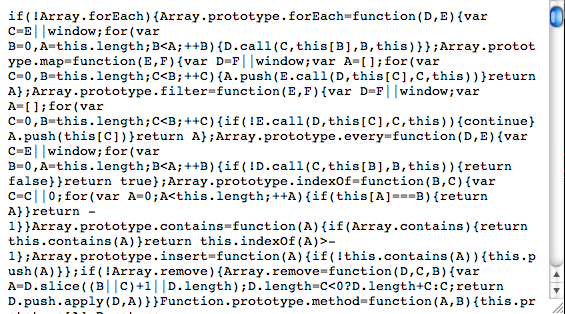
Obfuscation is an alternative way of reducing the source code. As well as the minimization, it removes the spaces and the comments, and additionally changes the code itself. For example, during the obfuscation function names and variables are replaced by shorter names, which makes the code more compact but less readable. Typically, this technique can be used to complicate the program’s reverse engineering. Obfuscation also helps to reduce the code much more than by simple minimization. It’s not that easy to find the best JavaScript obfuscation software, but I think that the most common tool is the Dojo Compressor (ShrinkSafe).
Minimization of JavaScript is a safe and relatively simple process. On the other hand, obfuscation may produce errors in the code because of its complexity. Obfuscation also requires changes to your code by highlighting API-functions and other elements that should not be changed.
Aggregation is the grouping of multiple files on a page into one. Aggregation is as safe as minimization, because the code is not changed. Sometimes "gluing" files may fail due to improper comments at the end of the files. Aggregation reduces the number of files connected to the page. Starting with Drupal 6 aggregation of CSS and JS files is built into the core, previous versions require the installation of an additional module.
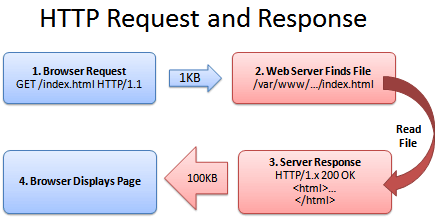
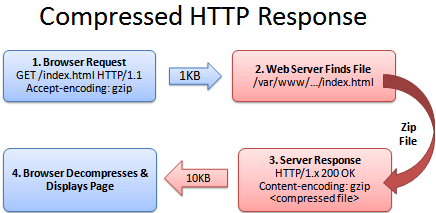
HTTP-compression is a way to compress the entire content (mainly text), which is rendered from the Web servers to browsers via the Internet. The main advantage of compression is that it reduces the number of bytes transferred and thus increases performance. HTTP-compression uses publicly available compression algorithms to encrypt HTML, XML, JavaScript, CSS and other file formats on the server side. This method of compressed content delivery is based on the standards and is included in HTTP/1.1 and all modern browsers support the HTTP/1.1 protocol. This way they can decompress compressed files automatically on the client side. This means that no additional software or user interaction on the client side is necessary.
Server request without compression
Server request and server response with compressed content
For cascading style sheets only minimization, aggregation and HTTP-compression can be applied. Obfuscation is not used for CSS files. JavaScript files can be optimized in any of the described ways.
Overview of the existing Javascript-compressors.
The degree of compression of a file can be compared by using the JavaScript Compressor and Comparison Utility online service.
- JSMin JSMin is a traditional compressor, written a few years ago by Douglas Crockford. This tool is safe (especially if before using it you checked your code with JSLint), because it does not try to change the names of variables.
- Dojo shrinksafe is a very popular JavaScript compressor written in Java. It parses the code using the rhino library and changes the names of local variables.
- Packer written by Dean Edwards. Another very popular JavaScript compressor with a higher level of compression that also performs decompression as JavaScript is being executed.
- YUI Compressor is a new compressor written by Julien Lecomte, which aims to combine JSMin security with the highest level of compression achieved by Dojo Shrinksafe. Like Dojo Shrinksafe, it is written in Java and based on the rhino library.
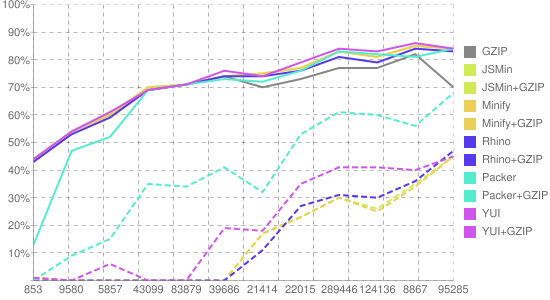
The degree of compression is different for all compressors, because the compression methods are different. Compression of small files, usually gives a very small degree of compression, files of more than 10Kbytes are compressed very well. The chart below shows the relation between the degree of compression and the file size:
Solutions to the Problem
So, we have a fairly large number of files that can be compressed and we need to sort out what Drupal has to offer (in the core and additional modules) and find the best solution.
Let’s start with an analysis of “out of the box” solutions we already have.
Standard Drupal Features
JavaScript and CSS files aggregation, and HTTP-compression are implemented in the core of Drupal 6.
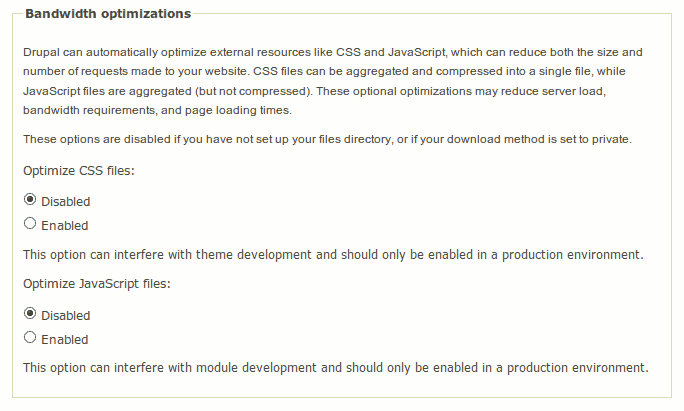
On the "Performance" page ("Performance" - admin admin/settings/performance) there is an option to enable/disable the optimization of CSS and JavaScript files:
If CSS and JS file optimization is disabled - this means that the aggregated file cache can not be written to files. Check whether the path to the folder files and write permissions for this folder on the File System page (File System - adminadmin/settings/file-system) are correct.
How does the optimization of JS and CSS-files work in the Drupal core?
To start using this opportunity you need to enable JavaScript or CSS-file optimization on Performance configuration page. Then during the theming of the page from the function template_preprocess_page() the drupal_get_css() function will be called. This function does most of the job for CSS-files.
- CSS is not optimized done when the website is in Maintenance mode or running an update (update.php).
- A parameter string allowing you to control file caching by the browser is added to the optimized file. When you run update.php or do a full cache reset, this string changes, that makes the browsers reload the new file versions, as they regard the URL to have changed.
- Whether the file participates in the optimization depends on the 4th argument of the function drupal_add_css() - $preprocess, which determines whether the file undergoes optimization, if it is enabled. By default, the file will be involved in the optimization.
- At first 2 lists are generated of files that do not participate in CSS optimization - separately (1) for modules, and separately (2) for themes.
- Next, the name will be created for a file that will store the optimized CSS and the <drupal_build_css_cache() function is called, which aggregates and optimizes CSS files.
- The resulting file is saved in sites/default/files/cssfolder (the multisite installation will have another path, but I think you know where they will be stored).
How does the drupal_get_css() function work?
What does the optimization comprise of?
- All @import instructions are processed in the drupal_load_stylesheet() and replaced by the content of a file to be imported.
- All comments with a single and double quotes are found and sent for processing to the function _process_comment(), which tries to determine whether this comment can be deleted or this is a hack for IE-Mac.
- Whitespaces are deleted around separators, but remain around the parentheses.
Thus, the optimization offered by Drupal core is actually minimization with aggregation into a single file.
Disadvantages of optimization techniques in Drupal core
The optimization technique used in Drupal core is safe, meaning it does not lead to errors in the code. But this technique is not as effective as it seems.
As a matter of fact, a page may contain about twenty different scripts, which are collected in a unique file to be cached. Scripts on the page can be loaded, depending on access rights or any other conditions that increases the number of options for a single page.
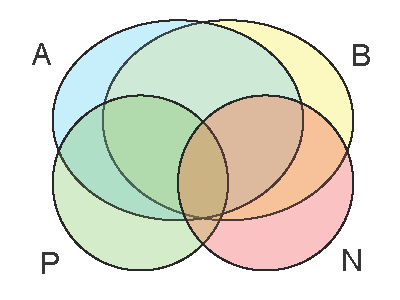
Thus we create a large file that aggregates scripts and the browser caches it for this page. On the next page a few scripts can be added or removed and a unique file, aggregating scripts for this page will be created. Browser will cache it too, but these 2 large files contain a lot of common code, that is rendered twice and cached by the browser separately in files with different names. Thus, the effective caching (if enabled), this technique may produce even more traffic.
JavaScript optimization in the core of Drupal
JavaScript optimization is similar to optimizing the CSS-files.
This way of gluing can produce errors in the aggregated file, when the last string in the end of the script was a comment.
When optimizing the JavaScript-files, they are merged into one large file in a little different way - ";\n" is added after each file.
The JS-file code itself does not change - it can be seen in the code of function drupal_build_js_cache(), but is simply merged into one big file.
That is Drupal core does not even minimize JavaScript!
Using HTTP-Compression
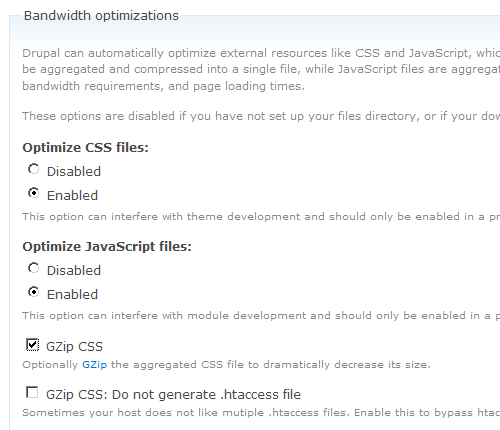
On the Performance configuration page HTTP-compression can be enabled and disabled:

Function page_set_cache() saves compressed page content in the cache, if:
- you choose to enable traffic compression on the Performance configuration page,
- the PHP zlib ) extension is present in the system,
Drupal caches the page content, and in case if the above conditions are met, compresses and then caches the page content..
If the browser supports HTTP-compression, it specifies what types of compression it can work with in a page request:
Accept-Encoding: gzip,deflateA simple online web page compression / deflate / gzip test tool is a service that checks whether the server returns a file using HTTP-compression and the degree of compression.
If the server uses HTTP-compression, it will compress and give the browser a compressed version of the content.
However, with the help of zlib library Drupal is able to compress and cache an already compressed version of HTML-pages, but not JS and CSS-files.
This means that if your web server is configured to compress the content and the browser supports such compression, the server will compress JS and CSS-files straight away. But it would be much more effective to store compressed copies of these files with the highest possible degree of compression, and not compress them straight away (in which case the default is not the maximum degree of compression).
Additional modules
JavaScript Aggregator Module
The module minimizes JS-files using JSMin.
The module can compress aggregated and minimized JS-files using the gzip-compression. Compressed copy is stored in a file on the server and is given to the browser instead of compressing the file by the server.
Example of compression:
FILENAME                                       SIZE              DESCRIPTION
6e13ccb6262e06b9f890414db56d3b1f.js            289.558 Bytes  >  Aggregated by Drupal Core
6e13ccb6262e06b9f890414db56d3b1f.jsmin.js      173.243 Bytes  >  Minified with JSMin
6e13ccb6262e06b9f890414db56d3b1f.jsmin.js.gz    47.618 Bytes  >  Minified and gzipped
CSS Gzip module
- Compresses aggregated CSS-files, just like Javascript Aggregator module compresses JS files.
- Compresses the content once and stores the result - it reduces the server processor load.
- Uses the 9th level of compression as it should be done only 1 time for each file that gives a smaller file size.
- Requires the inclusion of ”Clean URLs”(mod_rewrite).
- Requires the download method to be "public" (see admin/settings/file-system).
- Is included into the core of Drupal 7.
Parallel module
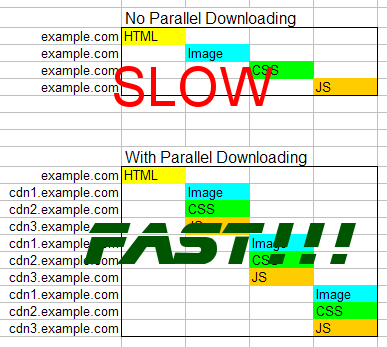
- Allows the browser to load parallel external files.
- This is done by creating 3 new sub-domain that direct to a single root folder of the site.
- Enable Parallel module.
- On the "Performance" page specify these subdomains.
- No Drupal core hacking needed.
- Parallel module works only with JavaScript, images and CSS.
IE CSS Optimizer module
- The module allows developers to exclude certain module files, as well as theme CSS-files from aggregation.
- Requires the download method to be "public" (see admin/settings/file-system).
- In Drupal 7 the module is not needed: http://drupal.org/node/228818.
- Other modules can override $vars['styles'] and thus neutralize the module. This can be fixed by changing the module weight.
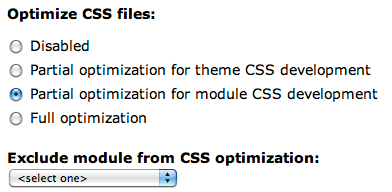
IE Unlimited CSS Loader module
"don’t use @import" - an article on why using @import is not desirable in terms of performance.
The module does about the same thing as IE CSS Optimizer module, but a little bit differently – it uses @import to solve the 31 CSS-file limit of IE.
CSSTidy module
- The module automatically starts CSSTidy at the maximum level of compression.
- Can be configured so that the code remains readable.
- Module is not compatible with Pressflow.
- The new CSS3 can cause problems (see http://drupal.org/node/763730). Some of them have already been solved: http://drupal.org/cvs?commit=432558
What is optimized:
-
Blackandrgb(0,0,0)colors are converted to hex codes like#000, whenever possible. Some hex-codes are replaced by their color names, if they are shorter (#f00->red). a{property:x;property:y;}becomesa{property:y;}(all repeating attributes are combined).margin:1px 1px 1px 1px;becomesmargin:1px;.margin:0px;becomesmargin:0;.a{margin-top:10px; margin-bottom:10px; margin-left:10px; margin-right:10px;}becomesa{margin:10px;}.margin:010.0px;becomesmargin:10px;.- All unnecessary spaces are removed.
- All
background:properties are merged together. - All comments are removed.
- Last semicolon in every block is removed.
- Missing semicolons are added, incorrect line breaks in strings are fixed, wrong colors (and color names) are corrected.
property:value ! important;becomesproperty:value !important;
CSS-hacks that work:
- div#test
- head:first-child+body div
- body>div
- html[xmlns] div
- @import "null?\"\{"; @import "styles.css"; (and all other @import rules)
- @media all{/* rules */}
- * html div
- i{content:"\"/*"} div{property:value}
- html*#test
- _property:value
- *property: value;
Testing page loading speed
We measured the page loading time to figure out how the average download time changes depending on different methods of JS-file optimization. The test site has over 1300 JS-files, almost 450 CSS-files and 227 installed modules (including core modules). We studied different methods of optimization:
- Optimize JavaScript files: Disabled - JS-file optimization by Drupal core disabled
- Optimize JavaScript files: Enabled - JS-file optimization by Drupal core enabled
- Optimize and Minify JavaScript files: Enabled - JS-file optimization by Drupal core is enabled and an additional Javascript Aggregator module is installed, which minifies the JS code even more.
Test conditions
Browser Settings
- Page checked: Test site homepage
- Browser: Firefox 3.6.13
- Browser cache: 500M
- Measurement tool: Yslow 2.1.0
- Proxy server: not used
Server Settings
- Server uses: Accelerator
- Operating System: Linux
- Kernel version: 2.6.29-5
- Architecture: x86_64
Drupal Settings
- Drupal User: superadmin
- Caching mode: Normal
- Minimum cache lifetime: none
- Page compression: enabled
- Block cache: enabled
- Optimize CSS files: enabled
Test Results
Average page load time
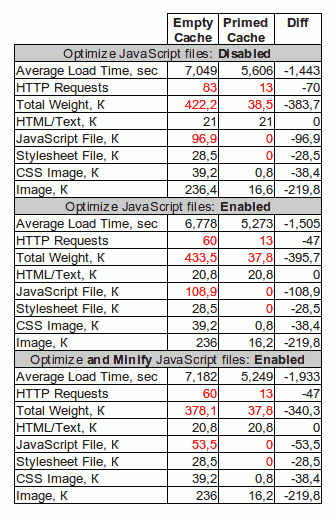
Chart of page load times in different modes
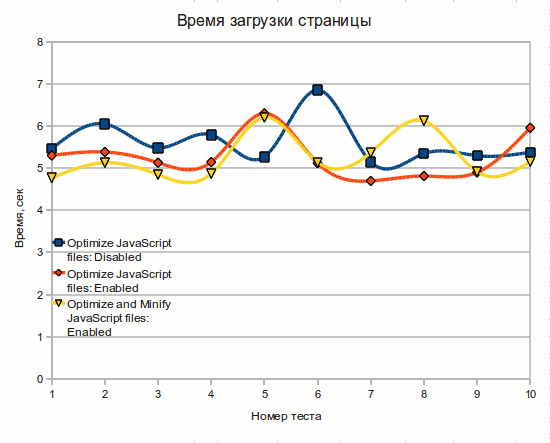
Test results analysis
- Aggregation reduces the number of requests to server (with empty cache) by 23 .
This means that when a user first loads the page (the cache is empty), it will load faster. - Using browser cache can reduce the number of requests to 13.
Repeated requests the same page are performed even faster because the browser caches some files.
The cache is usually enabled by default, but we can’t control browser caching or it can simply be disabled. - Gzip-compression is not done with the maximum level of compression.
Aggregated JS-file has the exact same size as the total size of all non-aggregated JS-files of the page. Aggregated file on the server has a size of 326.9 kilobytes, and the file received by the browser and compressed by gzip weighs 108.9 Kb. Manual gzip compression of the file results in file size of about 90Kbytes. The reason is that the zlib library, used to compress files on the server has the default degree of compression (zlib.output_compression_level) equal to "-1", although the maximum degree of compression is "9", and "-1" is the best performance. Thus we get the worst of compression, but high server performance. - JavaScript Aggregator module, together with aggregation and Gzip-compression result in file size much smaller , than that of non-aggregated files.
Therfore we experimentally found that the optimization of JS-files by the Drupal core doesn’t always show good results. In our case (without the use of JavaScript Aggregator module) we received a slight increase in loading speed (by reducing the number of requests) and an increase (compared with the original files) in the size of aggregated (or compressed) file.
Given that many pages load the same JS and CSS files, with only a few specific files added or removed, caching a large file won’t give a performance boost. In this case, the caching of separate CSS files and scripts on the same page will save time on loading these same files on other pages.
A user typically does not load the same page several times, and goes on surfing, thus browser caching of small script and CSS files can be more efficient than aggregation into a single file. But this is only for the user, it’s better for the server to have as few requests as possible and give aggregated files instead of piles of small files.
What can be done to improve the situation?
- Store compressed JS files with the maximum level of compression, so as not to cause the server to compress them for each request.
- Use more efficient methods of JS and CSS file compression.
- You can use a custom aggregation of scripts and styles common to different website pages, and load specific files separately, but this method is quite time-consuming.
- Move Javascript to footer, to accelerate the time of page load to the user.
- Use a CDN or Parallel module to increase the number of simultaneous connections that the browser can handle.
Moving JavaScript to footer
At the very beginning of this article, we found that a browser loads all CSS and JS from header and only then displays the page to the user and starts executing JS. That's why it makes sense to move the JS-files to the footer, to make the page content appear faster in the browser. This will reduce the time during which the user sees a "white page" and pages will visually load faster (the actual loading speed will remain the same).
JS-files in Drupal are connected as follows:
drupal_add_js($data = NULL, $type = 'module', $scope = 'header', $defer = FALSE, $cache = TRUE, $preprocess = TRUE)
here
$scope (optional) The location in which you want to place the script. Possible values are 'header' and 'footer' by default. If your theme implements different locations, however, you can also use these.
By default $scope is equal to "header" and, unless otherwise stated, all scripts are loaded in the header...
Thus the need to change $scope = 'header' to $scope = 'footer' in all the modules.
Just moving <?php print $scripts ?> to the footer won’t bring any result, because inline-scripts that will remain in the header will expect jquery.js and other scripts in the header and will return errors during execution.
For the 7th version of Drupal, there has been a discussion about the possibility to make 'footer' the default for $scope (Make 'footer' the default scope for drupal_add_js() so that pages render fast), but most likely this option will be implemented in the 8th version of Drupal.
Links
Script compresors
- JSMin.
- YUI Compressor.
- Dojo ShrinkSafe.
- Packer.
- The JavaScript Code Quality Tool - online service for checking JS code.
HTTP-compression
- How To Optimize Your Site With GZIP Compression - an article explaining the advantages of HTTP-compression
- Wikipedia: HTTP compression
- HTTP Compression by Constantin Rack
- A simple online web page compression / deflate / gzip test tool -online service allowing to identify whether the server gives compressed content.
Order of loading page elements by the browser
- Browser Load order - old correspondence about the order, in which browsers load external files (2006)
- Browser Page Load Performance - information about the fact that CSS and JS don’t download concurrently and the reasons why this is happening.
Transferring Javascript to footer
- Make 'footer' the default scope for drupal_add_js() so that pages render fast - discussion of whether it’s possible/necessary to transfer javascript into page footer on drupal.org.
- Drupal API: drupal_add_js()
Miscellaneous
- How To Minimize Your Javascript and CSS Files for Faster Page Loads - old article (2007) with an overview of JS and CSS optimization techniques.
- YUI Compressor Online - online service of JavaScript aggreagation and compression using YUI Compressor.
- Online JavaScript/CSS Compression Using YUI Compressor - another online compression service using YUI Compressor.
- Front-end optimization modules for better browser performance
- Firefox 3 beta 5: How many connections is too many?